
EFT Companion
Raid planning, screenshot loot valuation, and task tracking
Screenshots
Video Demo
Free
Gaming
Productivity
Utility
Built with Claude AI
 Openai
Claude AIOpenaiWhat is EFT Companion?
EFT Companion is an assistant tool built for Escape from Tarkov players. It helps operators organize their progression, monitor in-game economy metrics, and plan raids around specific quest objectives. By linking public player data or reading game logs, it eliminates the need to manually browse external wikis and databases during play sessions.
A primary challenge in Tarkov is managing complex task lines, volatile flea market prices, and hidden stash values. EFT Companion addresses this by combining interactive map data, hideout progress tracking, and automated inventory evaluation. Players can understand what their inventory is worth immediately and see which trader tasks can be tackled together in an upcoming raid.
Its approach stands out through visual recognition and log integration. Instead of typing item names into search bars, players can paste stash screenshots to automatically calculate market values, inspect ammo armor-penetration stats, and detect profitable crafts or barter trades tailored to their character's actual unlocks.
Who is it for?
EFT Companion is designed for Tarkov players looking to reduce downtime in their hideout and maximize raid efficiency.
- PvE and PvP operators who want to plan quest routes across specific maps and times of day.
- Solo players needing fast inventory valuation to decide whether to sell to traders or list on the flea market.
- Squad leaders coordinating team drops, shared locations, and looking-for-group sessions.
- Hideout managers seeking to identify profitable station crafts, barters, and trader resales.
Key features
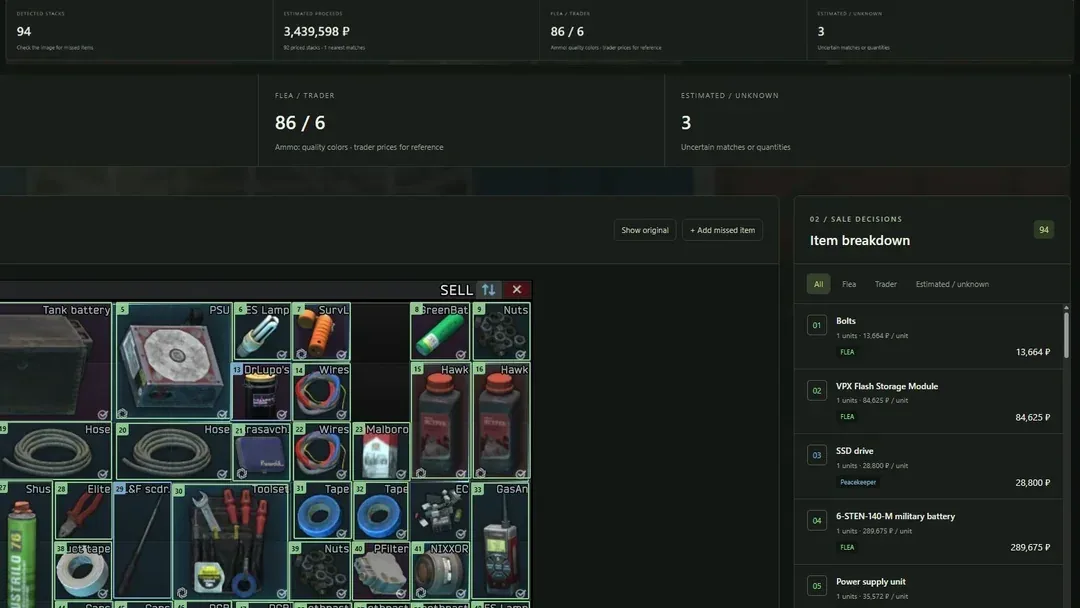
- Screenshot Loot Valuation: Paste an inventory screenshot to detect item stacks, compare flea market versus trader sale prices, and highlight slots worth over 50k or 100k roubles.
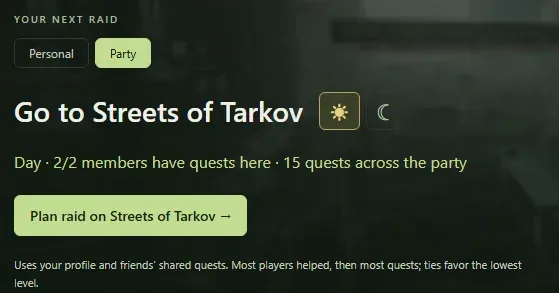
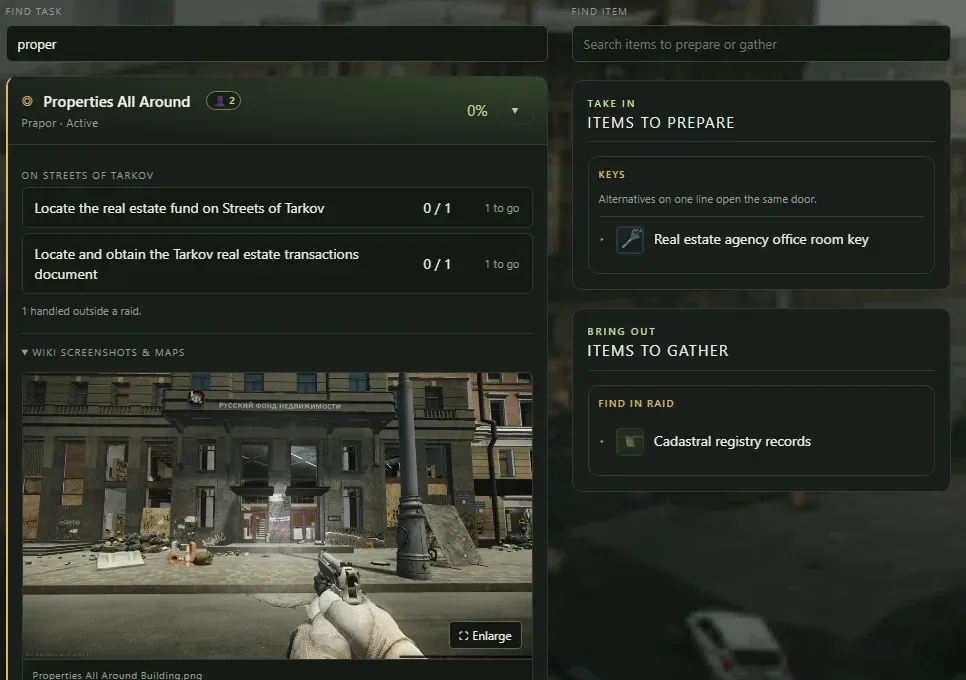
- Raid Planner: Select an upcoming map, choose day or night conditions, and generate a customized list of active tasks alongside gear to bring in and items to extract.
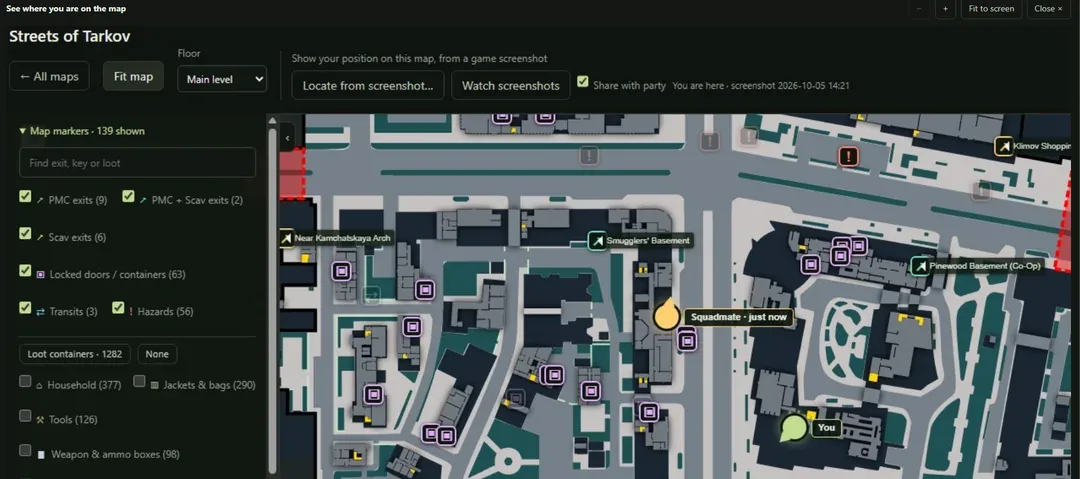
- Interactive Maps: Access detailed maps populated with extract zones, key requirements, loot locations, and quest objective markers sourced from tarkov.dev.
- Task Journal: Filter quests by trader, completion status, or edition eligibility to stay organized across wipes and updates.
- Craft and Barter Calculators: View current flea market margins, net profits, and profits per hour across hideout craft stations, barters, and trader resells.
- Ammo Quality Indicators: View armor-penetration tiers directly on detected ammunition stacks to make rapid tactical decisions about ammo value versus combat utility.
- Automatic Progress Syncing: Import character levels, faction settings, and skills via the Windows desktop companion app or web-based game log reading.
- Party Location Sharing: Share recent coordinates with party members on interactive maps during PvE operations.
Use cases
A player returns from a raid with an inventory full of barter goods, weapon parts, and loose ammunition. By pasting a single screenshot into the tool, they instantly see which stacks should be sold to traders, which items are banned from the flea market, and which high-penetration bullets are worth keeping for future kits.
Before queueing into a map like Customs or Woods, a squad needs to coordinate multiple operational goals. The team opens the raid planner to display everyone's active quests simultaneously, ensuring the planned route covers key extraction points and quest objectives in a single run.
An operator looking to generate passive income reviews the crafts tab. The system factors in current hideout management skills, intelligence center levels, and live material prices to show the highest return-on-cost crafts available across all built stations.
Pricing
EFT Companion is entirely free to use. Players can access interactive maps, item prices, loot evaluation tools, and guides as guests, or create a free account to track hideout progression, save profiles, and use squad-sharing features without subscription tiers or trial periods.
Alternatives
EFT Companion acts as an alternative to standalone platforms like tarkov.dev or the community wiki. While the official wiki provides static documentation, EFT Companion emphasizes automated screenshot recognition and dynamic profit calculations. Compared to standard static maps, it integrates personal task tracking directly into the map display.
FAQ
Is EFT Companion free?
Yes, all features on the platform are free to use, and core tools like maps and screenshot loot checks can be used without registering an account.
How does the screenshot loot valuation work?
You paste or upload an image of your inventory in PNG, JPG, or WebP format up to 20 MB. The system recognizes item stacks, calculates slot values, and categorizes sales by trader or flea market prices.
Loading...
Related products
View all
iSkitch
iSkitch is a modern, native macOS take on the classic Skitch
0
Screenshot, Productivity, Note Taking
0
Screenshot, Productivity, Note Taking

Elasticnote
Local-first Markdown notes, tasks, LaTeX, and research works
0
Note Taking, Productivity, Knowledge Base
0
Note Taking, Productivity, Knowledge Base

Mind Refactory
Self-directed mental processing framework for engineers
4
Mental Health, Productivity, Personalization
4
Mental Health, Productivity, Personalization

Walyro
Set live video wallpapers on your Mac
3
Desktop App, Personalization, Utility
3
Desktop App, Personalization, Utility


More categories
All categories



Launched in Week 49, 2026
See the week
Pocket Invoice
Free invoices, estimates and PDFs for small businesses
0
Finance
0
Finance
18d20h6m
Launches in18days
:20hours
:06mins
:08secs

MovieDice
Personalized movie picks without endless scrolling
0
Recommendation Engine, Entertainment
0
Recommendation Engine, Entertainment
18d20h6m
Launches in18days
:20hours
:06mins
:08secs

Another Directory
Because apparently the internet needed one more.
0
Marketing, SEO Tools, Directory
0
Marketing, SEO Tools, Directory
18d20h6m
Launches in18days
:20hours
:06mins
:08secs

Cosmiq
The free AI tutor that adapts to every mind
0
Education
0
Education
18d20h6m
Launches in18days
:20hours
:06mins
:08secs