
Video Transcriber
Turn video files and public links into searchable text
Screenshots
Freemium
Video Transcription
Transcription
Speech to Text
Built with .NET
.NETWhat is Video Transcriber?
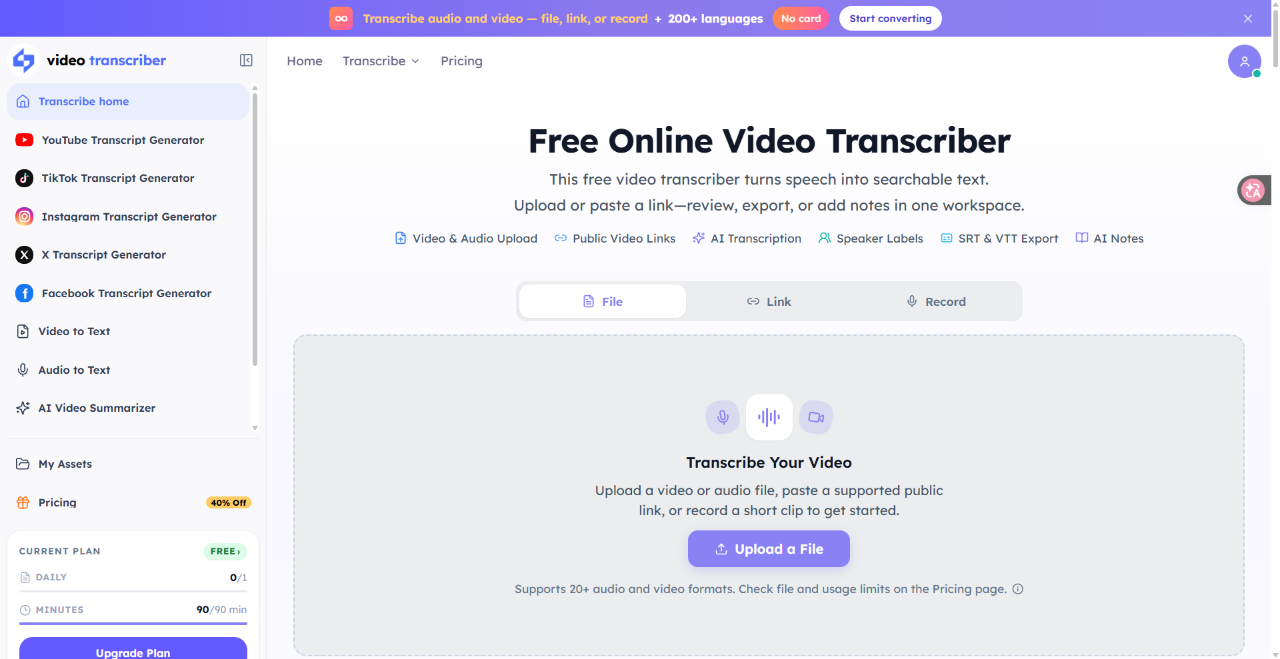
Video Transcriber is a web-based transcription tool that turns spoken words in video and audio recordings into searchable text. Instead of manually typing dialogue or replaying media files repeatedly to pull quotes, users can upload files, paste online links, or record audio directly inside their browser.
The service addresses the slow, tedious chore of manual transcription by using speech recognition across more than 200 languages. It automatically identifies spoken language and supports speaker labels to distinguish between different participants in conversations.
Unlike tools limited to plain text downloads, Video Transcriber functions as an active media workspace. It pairs standard subtitle generation with AI-driven summaries, study notes, mind maps, and chapter outlines directly from your source files.
Who is it for?
Video Transcriber serves individuals and teams handling recorded multimedia content regularly.
- Podcasters and video creators who need show notes, quote snippets, and caption files like SRT and VTT.
- Researchers and journalists gathering quotes from recorded interviews or public online videos.
- Students and educators converting recorded lectures and educational lessons into study summaries.
- Product managers and remote workers archiving Zoom meetings and call recordings to track action items.
- Writers and founders capturing rapid thoughts through quick voice memos.
Key features
- Extensive Language Support: Automatically detects and transcribes speech across more than 200 supported spoken languages.
- Multiple Media Input Options: Accepts local audio and video files, supports recording straight from your browser, and processes public links from platforms like YouTube and TikTok.
- Speaker Diarization: Applies speaker labels to conversations and interviews, making it easy to see who spoke and when.
- Diverse Export Formats: Exports transcripts to standard documents and caption formats, including TXT, DOCX, SRT, VTT, PDF, and CSV.
- AI Summaries and Mind Maps: Generates key takeaways, study outlines, chapters, and visual mind maps to grasp dense information quickly.
- Interactive Search: Offers a searchable transcript interface that allows users to jump directly to specific phrases in the audio.
How it works
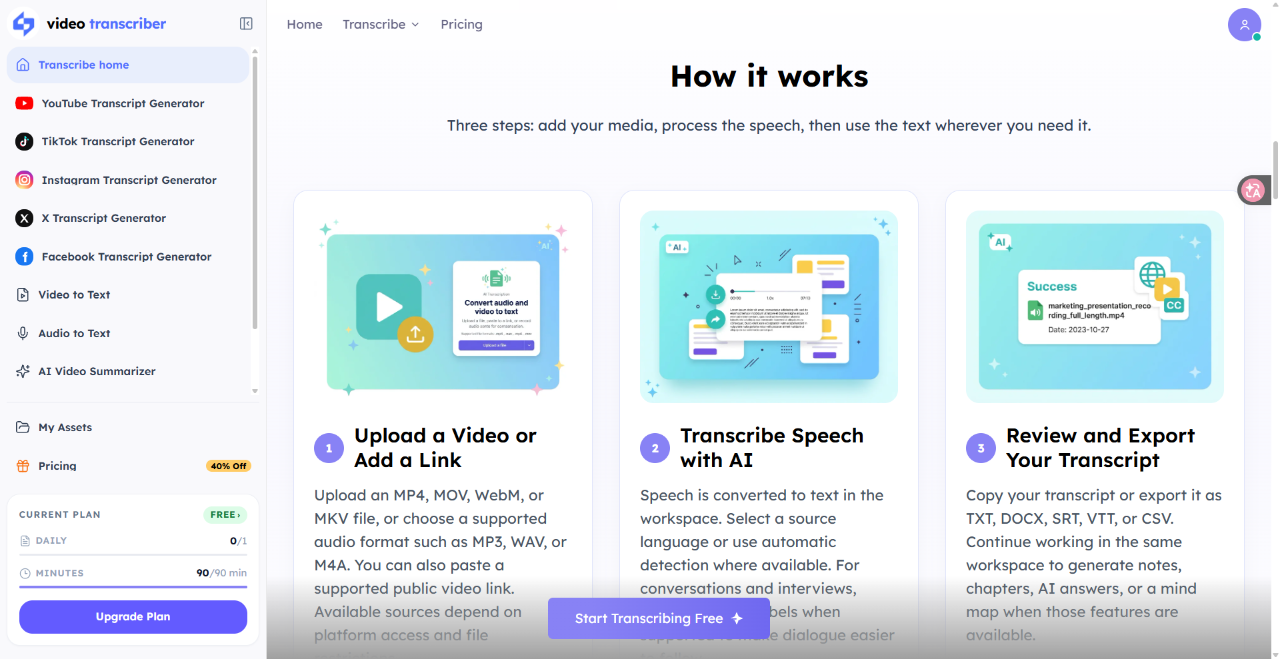
- Upload a media file in formats like MP4, MP3, WAV, or MOV, record a quick voice clip, or paste a public video link.
- Let the automated speech engine process the media, detecting the language and assigning speaker tags where applicable.
- Review the generated text, run AI analysis for summaries or mind maps, and export the file in formats such as SRT, TXT, or DOCX.
Use cases
A video creator can paste a public YouTube link to instantly generate accurate SRT subtitle files for publication, eliminating manual captioning steps.
A journalist conducting long remote interviews can upload audio recordings to search for specific quotes and identify different speakers via timestamps.
A remote team lead can process recorded meeting sessions to extract action items and share brief summaries without forcing team members to watch full recordings.
Pricing
Video Transcriber offers a Freemium model. The Free plan provides 90 minutes per month with no credit card required, allowing 1 file per day up to 30 minutes in length, along with basic AI summaries and standard exports. Paid plans are billed annually or monthly. The Basic plan costs $6 per month billed annually ($72 per year) or $10 month-to-month for 1,200 minutes per month and files up to 5 hours. The Standard plan costs $12 per month billed annually ($144 per year) or $20 month-to-month for 3,000 minutes and bulk transcription. The Pro plan costs $18 per month billed annually ($216 per year) or $30 month-to-month for 6,000 minutes. Extra minute packs are also offered.
FAQ
Is there a free plan available?
Yes, Video Transcriber offers a free plan providing 90 minutes of transcription every month without requiring a credit card.
Which media formats can I upload?
The platform supports over 20 media formats, including MP4, MOV, WebM, MKV, MP3, WAV, and M4A, alongside public link inputs and direct browser recording.
Can Video Transcriber separate different speakers?
Yes, the service provides speaker identification features to label distinct speakers in interviews and meetings.
Can I export subtitle files for video editing?
Yes, transcripts can be downloaded as SRT or VTT subtitle files, as well as TXT, DOCX, PDF, and CSV files.
Loading...
Related products
View all


More categories
All categories







Launched in Week 51, 2026
See the week
InspectProHQ
The Complete Business Platform for Home Inspectors.
0
Real Estate, CRM, Invoicing
0
Real Estate, CRM, Invoicing
32d20h26m
Launches in32days
:20hours
:26mins
:27secs

Photo Collage Maker & Grid
Free collage maker: no watermark, no ads, works offline
0
Photo Editing
0
Photo Editing
32d20h26m
Launches in32days
:20hours
:26mins
:27secs

CoinBoss
Live crypto liquidations, open interest & funding
0
Crypto, Data Analytics, Analytics Tool
0
Crypto, Data Analytics, Analytics Tool
32d20h26m
Launches in32days
:20hours
:26mins
:27secs

Tennis Relics
Collect, trade, and battle with virtual tennis cards
0
Gaming, Sports, Entertainment
0
Gaming, Sports, Entertainment
32d20h26m
Launches in32days
:20hours
:26mins
:27secs