FocusRabbit: Screen Time Detox
Block distracting apps and control daily screen time
Screenshots
Free
Productivity
Mobile App
Habit Tracking
Built with Xcode
XcodeWhat is FocusRabbit?
FocusRabbit is an iOS productivity and screen time management tool designed to reduce distractions and stop doomscrolling. By interacting directly with Apple's Screen Time framework, the tool restricts access to selected applications once specific thresholds are hit or during prearranged focus windows.
Many people find themselves losing hours each day to repetitive mobile habits and social media feeds. FocusRabbit addresses this problem by providing strict structural barriers, allowing users to configure both total daily limits and session-based restrictions so they can maintain concentration while studying, working, or unwinding in the evening.
Unlike many modern habit utilities, FocusRabbit takes an entirely private approach. All processing of screen time data happens locally on the user's iPhone. There are no user accounts required, no tracking mechanisms, and zero advertisements displayed within the interface.
Who is it for?
FocusRabbit is designed for individuals seeking strict control over their mobile device usage, including:
- Students who need to restrict social media while studying for exams.
- Knowledge workers and remote professionals trying to avoid mid-day mobile distractions.
- People who want to curb evening phone use before sleeping.
- Users seeking a private screen time tool that does not collect personal data.
Key features
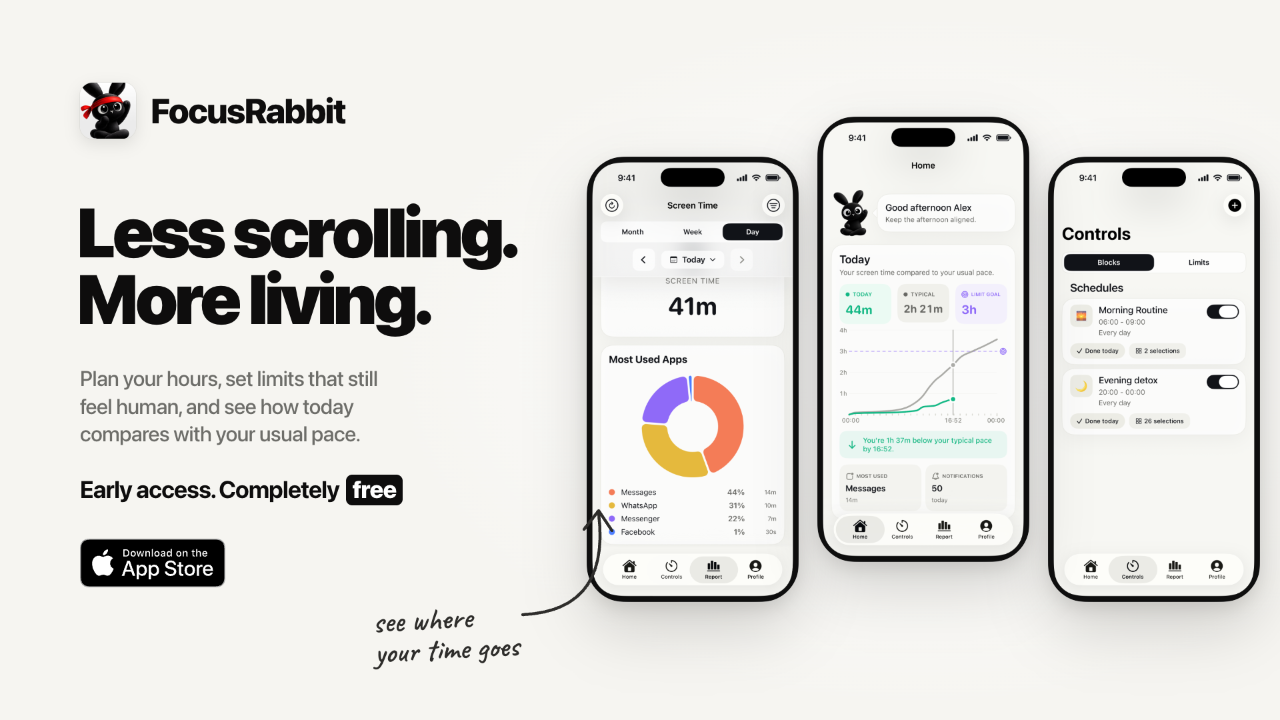
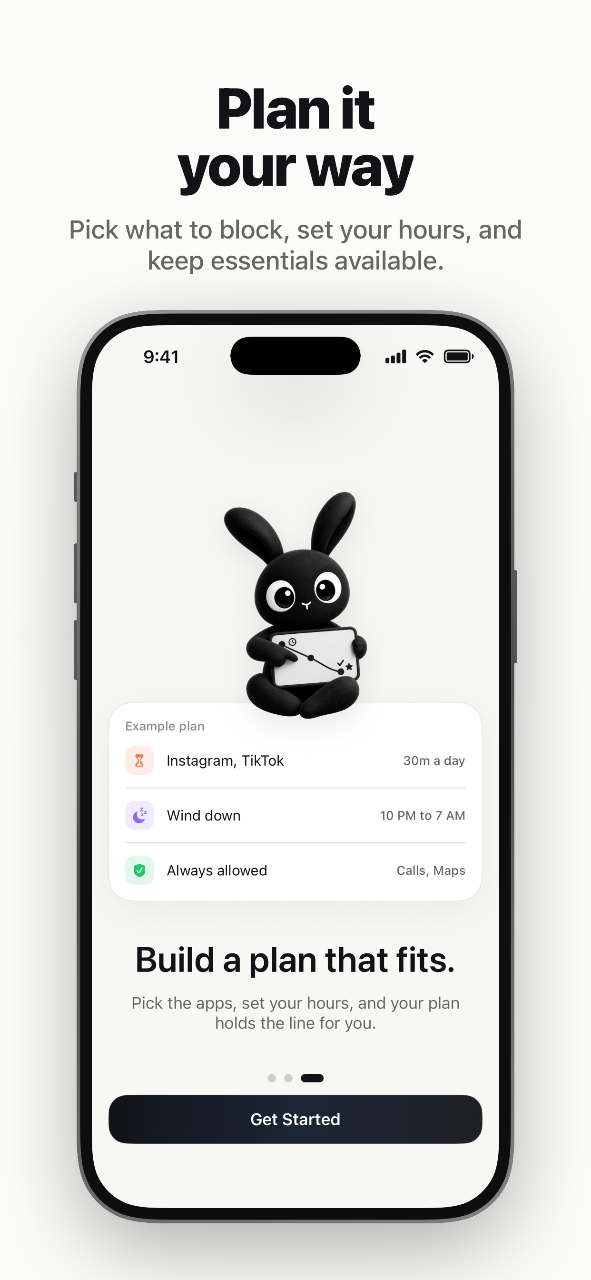
- Daily Duration Limits: Set a maximum cumulative time allowance for specific apps each day, after which the application remains inaccessible until the next day.
- App Launch Thresholds: Specify how many times an application can be unlocked in a day and determine how long each unlock window lasts.
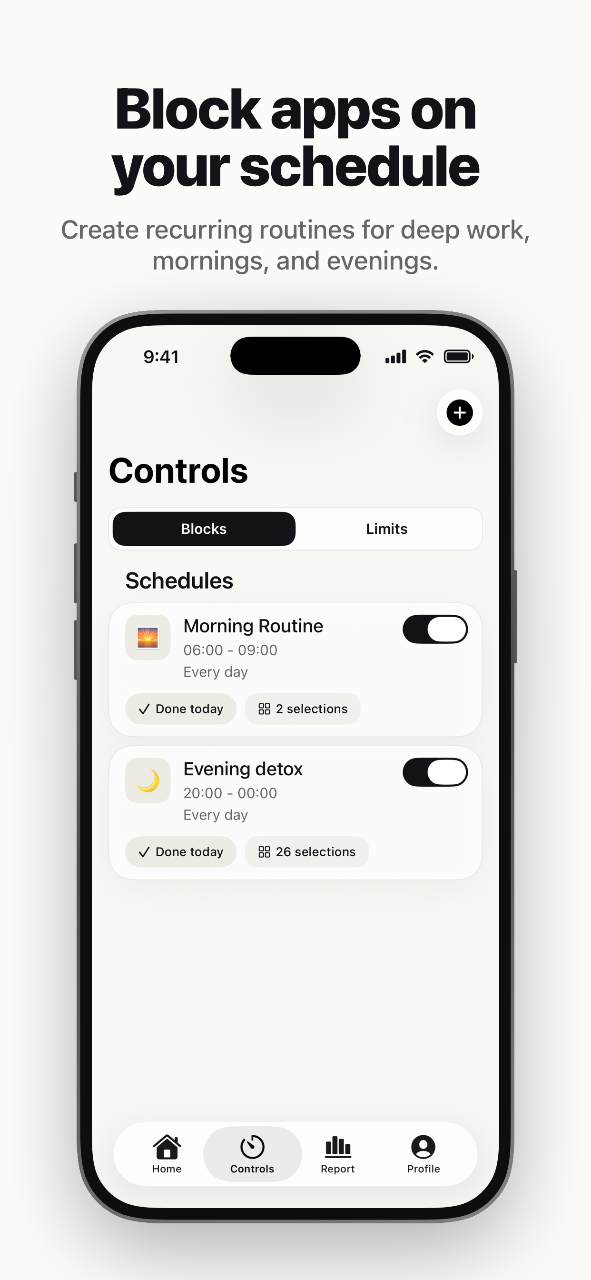
- Scheduled Blocking: Plan automated restrictions across selected days of the week to align with work shifts, study schedules, or sleep routines.
- On-Demand Focus Sessions: Start an immediate blocking session whenever you need uninterrupted concentration, with an optional delay timer before an early exit is permitted.
- App Exclusion Lists: Select essential software that remains available even during intense focus periods.
- Local Analytics: Review daily mobile usage, app activation counts, and notification volumes compared directly against your historical trends.
- On-Device Privacy: Process all Screen Time reports locally without transmitting personal usage statistics to external servers.
How it works
- Download FocusRabbit on an iPhone running iOS 17.0 or newer and grant the required Apple Screen Time permissions.
- Select the distracting applications you want to restrict and configure your preferred daily time or opening limits.
- Establish recurring schedules for focus intervals or trigger a spontaneous session when starting a task.
- Review on-device metrics to track your total screen time and app opens over time.
Use cases
A university student can set a strict one-hour daily limit across entertainment applications, ensuring the apps shut down automatically once the threshold is crossed to prevent evening study sessions from being derailed.
A remote worker can create an automated schedule blocking news and communication tools between 9:00 AM and 5:00 PM on weekdays, keeping essential work utilities accessible while eliminating personal phone interruptions.
An individual aiming to improve sleep quality can block social media apps every night after 10:00 PM, utilizing a mandatory waiting delay to discourage impulsive late-night browsing.
Pricing
FocusRabbit is completely free to download and use on iOS. There are no paid subscription tiers, in-app purchases, advertisements, or lifetime fee options.
FAQ
How much does FocusRabbit cost?
FocusRabbit is entirely free with no in-app purchases, paid tiers, or subscriptions.
Which platforms and devices are supported?
The application supports iPhone running iOS 17.0 or later, as well as Mac computers running macOS 14.0 or newer with Apple M1 chips or newer.
Does FocusRabbit track personal browsing or screen data?
No. FocusRabbit processes all data on your device using Apple's built-in Screen Time framework. The developer does not collect data, run advertisements, or require an account.
What happens when an app limit is reached?
Once you hit your designated daily time limit, FocusRabbit blocks access to that specific application for the remainder of the day.
Loading...
Related products
View all
iSkitch
iSkitch is a modern, native macOS take on the classic Skitch
0
Screenshot, Productivity, Note Taking
0
Screenshot, Productivity, Note Taking

Elasticnote
Local-first Markdown notes, tasks, LaTeX, and research works
0
Note Taking, Productivity, Knowledge Base
0
Note Taking, Productivity, Knowledge Base

Mind Refactory
Self-directed mental processing framework for engineers
4
Mental Health, Productivity, Personalization
4
Mental Health, Productivity, Personalization

DisplaySwitcher
Switch monitor inputs and transfer text and files
0
Desktop App, File Sharing, Productivity
0
Desktop App, File Sharing, Productivity


More categories
All categories






Launched in Week 49, 2026
See the week
Pocket Invoice
Free invoices, estimates and PDFs for small businesses
0
Finance
0
Finance
18d20h6m
Launches in18days
:20hours
:06mins
:04secs

MovieDice
Personalized movie picks without endless scrolling
0
Recommendation Engine, Entertainment
0
Recommendation Engine, Entertainment
18d20h6m
Launches in18days
:20hours
:06mins
:04secs

Another Directory
Because apparently the internet needed one more.
0
Marketing, SEO Tools, Directory
0
Marketing, SEO Tools, Directory
18d20h6m
Launches in18days
:20hours
:06mins
:04secs
Cosmiq
The free AI tutor that adapts to every mind
0
Education
0
Education
18d20h6m
Launches in18days
:20hours
:06mins
:04secs