
Arsaze
AI video editor with timeline autocomplete and agent tools
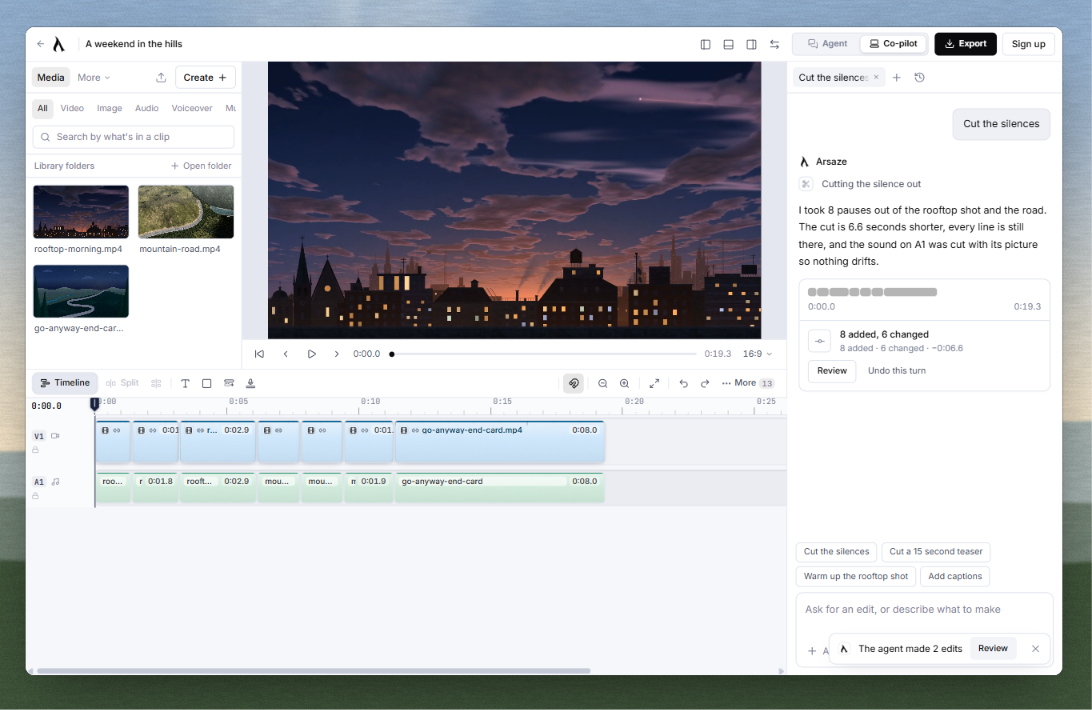
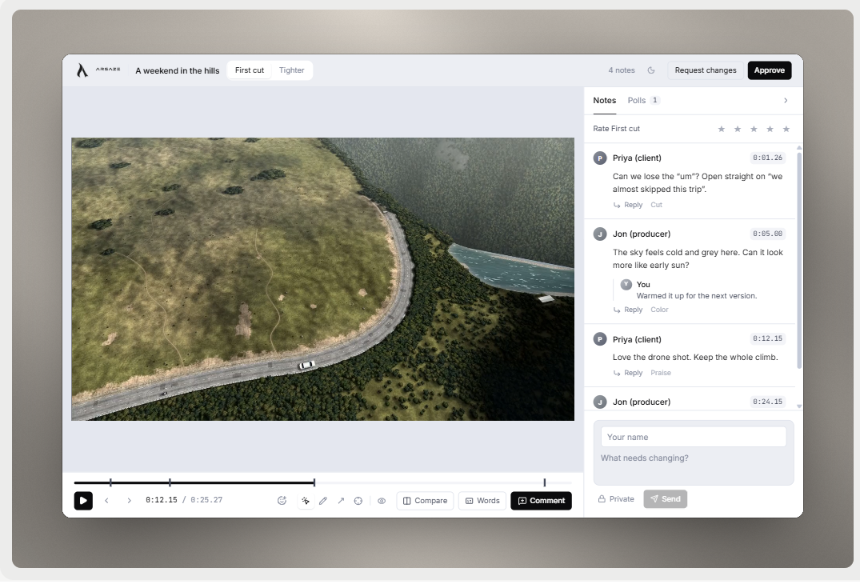
Screenshots

Freemium
Video Editing
AI Video
Screen Recording
Built with Vscode
What is Arsaze?
Arsaze is a multi-track video editor built for content creators, professional editors, and production teams. It addresses the tedious, repetitive phases of post-production by combining traditional non-linear editing tools with automated timeline assistance. Users can remove pauses, eliminate filler words, and generate word-level timed captions without manually scrubbing through footage.
What differentiates the software is its interactive editing model. Arsaze introduces Tab, an autocomplete feature that detects repetitive trimming patterns and applies matching cuts across the timeline with a single keystroke. In addition, the platform functions like an open environment for artificial intelligence: it connects directly with external models through Model Context Protocol (MCP) servers, allowing external agents to manipulate the timeline while preserving complete version history.
The editor operates both in modern web browsers and as a native desktop application for Windows, macOS, and Linux. Local processing allows users to run speech recognition, background removal, motion tracking, and exports on their own hardware without sending private footage to the cloud.
Who is it for?
Arsaze is designed for creative professionals and digital teams seeking faster turnaround times on spoken and visual content:
- Content creators producing talking-head videos, podcasts, and social media clips who need rapid silence and filler removal.
- Freelance video editors managing client review rounds without rendering intermediate drafts.
- Software teams recording and publishing annotated product demos, tutorials, and walkthroughs.
- Creative agencies and developers using external AI agents such as Claude, ChatGPT, or Grok to automate repetitive timeline operations.
Key features
- Tab Autocomplete: Analyzes your initial cuts, detects similar pauses or color adjustments across your footage, and lets you accept subsequent edits instantly by pressing Tab.
- Rewrite Transcript Editing: Converts speech into an interactive text document where deleting words cuts the corresponding video frames, complete with tracked changes.
- Model Context Protocol Integration: Connects to external agents like Claude, Grok, or ChatGPT via remote MCP servers using OAuth 2.1 to execute timeline edits via natural language instructions.
- In-Frame Client Review: Generates secure web links that allow stakeholders to draw on specific frames and attach feedback without rendering or exporting files first.
- Local Desktop Engine: Runs transcription, background removal, motion tracking, and full exports on your own machine without watermarks, credit consumption, or media uploads.
- Motion Tracking and Motion Studio: Tracks faces, objects, or text elements across frames to apply blurs, callouts, spotlights, camera solves, and keyframed graphic layers.
- Screen Studio Free: Records screen takes with automatic pacing adjustments, sensitive data blurring, click zooms, and companion documentation generation.
- Professional Color and Audio Tools: Includes color wheels, curves, LUT support, voice isolation, background noise reduction, and automatic speech ducking.
Pricing
Arsaze follows a Freemium pricing structure. The Free plan includes the complete multi-track editor, timeline tools, Tab autocomplete, visual search, and local desktop features (offline transcription, background removal, motion tracking, private projects, and watermark-free exports). Upgrades are billed monthly in Indian rupees via Razorpay (displayed in USD), covering cloud transcription, browser-based rendering, cloud storage, and AI generation credits. Credit packs are also available as one-time add-ons that never expire.
Alternatives
Compared to Descript, Arsaze offers a full multi-track non-linear editing timeline alongside text-based editing, allowing granular manual timeline control alongside transcript cuts. Compared to traditional NLEs like Adobe Premiere Pro or DaVinci Resolve, Arsaze incorporates native timeline autocomplete and direct remote MCP agent connectivity, while still exporting to those suites through FCPXML.
FAQ
Can I use Arsaze for free without a watermark?
Yes. The desktop app provides free, unlimited exports without watermarks, running rendering, transcription, and background removal directly on your computer hardware.
Do I need a paid plan to use the Tab autocomplete feature?
No. Tab autocomplete is included on every plan, including the Free tier, across web browsers and the desktop application.
Loading...
Related products
View all
BudgetPixel
AI image, video, and music generation on one account
1
Generative AI, AI Image Generation, AI Video
1
Generative AI, AI Image Generation, AI Video



MiniMax H3 AI Video Generator
Create 2K AI videos with references and synchronized audio
0
AI Video, Video Editing
0
AI Video, Video Editing


More categories
All categories







Launched in Week 4, 2027
See the week
SuperCalc
Run everyday calculations in your browser
0
Calculator, Finance, Utility
0
Calculator, Finance, Utility
74d20h6m
Launches in74days
:20hours
:06mins
:26secs
Dog Age Calculator
Free dog-to-human age converter by size & birthday
0
Productivity, Pets, Calculator
0
Productivity, Pets, Calculator
74d20h6m
Launches in74days
:20hours
:06mins
:26secs